Note
Go to the end to download the full example code
ANother cybepunk example
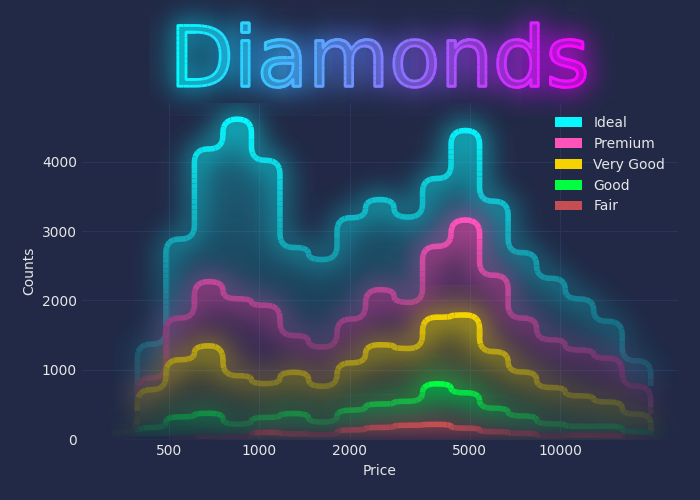
/home/docs/checkouts/readthedocs.org/user_builds/mpl-visual-context/checkouts/stable/examples/30-showcase-cyberpunk.py:33: FutureWarning: The default of observed=False is deprecated and will be changed to True in a future version of pandas. Pass observed=False to retain current behavior or observed=True to adopt the future default and silence this warning.
  g = diamonds.groupby("cut")
#* Import things

import seaborn as sns
import matplotlib as mpl
import matplotlib.pyplot as plt

from mpl_visual_context.patheffects_color import StrokeColorFromFillColor

#* use mplcyberpunk for background and colorsets

import mplcyberpunk

plt.style.use("cyberpunk")

#* load diamonds datasets
diamonds = sns.load_dataset("diamonds")

#* Plot
fig, ax = plt.subplots(figsize=(7, 5), num=1, clear=True, layout="constrained")

sns.despine(fig)

import numpy as np
bins = np.logspace(2.5, 4.3, 20)

g = diamonds.groupby("cut")
cut_names = ['Fair', 'Good', 'Very Good', 'Premium', 'Ideal']

bottom = np.zeros(len(bins)-1, dtype="i")
hh = []
for i, cut in enumerate(cut_names):
    g1 = g.get_group(cut)
    cnt, edges = np.histogram(g1["price"], bins=bins)
    hh.append((cut, cnt, edges, bottom))
    bottom = bottom + cnt

# We are using stairs command.
for cut, cnt, edges, bottom in hh[::-1]:
    sp = ax.stairs(bottom+cnt, edges, baseline=bottom, fill=True,
                   label=cut)

ax.set(xlabel="Price", ylabel="Counts")
ax.set_xscale("log")
ax.xaxis.set_major_formatter(mpl.ticker.ScalarFormatter())
ax.set_xticks([500, 1000, 2000, 5000, 10000])
ax.legend()

ax.set_title("Diamonds", size=60)

#* Lets give it some taste of patheffects. We import necessary modules.

import mpl_visual_context.patheffects as pe
import mpl_visual_context.image_box as ib
import mpl_visual_context.image_effect as ie

from mpl_visual_context.patheffects_color import BlendAlpha
from mpl_visual_context.patheffects_multicolor import MultiColorLine


#* We define a custom PathEffects

from matplotlib.patheffects import PathEffectRenderer
from mpl_visual_context.patheffects_base import ChainablePathEffect

class RendererSetPatheffects(ChainablePathEffect):
    def __init__(self, pel):
        self._pel = pel

    def _convert(self, renderer, gc, tpath, affine, rgbFace=None):
        renderer = PathEffectRenderer(self._pel, renderer)
        return renderer, gc, tpath, affine, rgbFace


#* Let's make the stairs have round corners

round_corner = pe.RoundCorner(10)

for p in ax.patches:
    p.set_path_effects([round_corner])

#* Add alpha gradient

alpha_gradient = pe.AlphaGradient("0 ^ 0.3")

for p in ax.patches:
    # The alpha value starts from 0 at the bottom and increase upward to be 0.5 at the top.
    p.set_path_effects([round_corner | alpha_gradient])

#* Add multicolor line

# the path were created using fill_between and has both upper and lower
# boundary. For the stroke, we only want to stroke its upper boundary, which is the 1st
# half of the path.
first_half = pe.Partial(0, 0.5)

# The line is not being stroked because its linewidth and alpha set to 0. So we
# override this and make the line thicker.
gc_for_stroke = pe.GCModify(linewidth=4, alpha=1)

for p in ax.patches:
    # For the ultiColorLine patheffects, we need to manually create an imagebox
    # and provide it to the patheffects. The MultiColorLine patheffect will
    # segment the path into small pieces and assign colors using the color from
    # the imagebox at the position of the path segment.
    ib_line = ib.ColorBox(p.get_fc(), alpha="up",
                          coords=p, axes=ax)
    multi_color_line = MultiColorLine(ib_line, min_length=5)

    p.set_path_effects([
        (
            first_half
            | round_corner
            | gc_for_stroke
            | multi_color_line
         )
    ])


#* Add multicolor line

# The above result is not ideal as it shows some artefacts where segments of
# different colors meet. MultiColorLine temporarily override capstyle to round,
# otherwise caps between segments can be bisible. This is not good if alpha is
# not 1 as overrapping area look brighter than other parts. There is no good
# solution for this. One workaround is to blend the color of line segments with
# background color which reset alpha to 1.

# pick up the color of background. This color will be used for alpha blending.
bg = ax.patch.get_fc()

# We want to blend bg for the results MultiColorLine. However, MultiColorLine
# patheffects, which draws multiple lines, is not further chainable. It
# terminates the chain. Behind the scene, MultiColorLine calss
# renderer.draw_path multiple times for each line segment. So, we need to
# override the renderer itself so that have its own patheffects (of alpha
# blending).

renderer_set_alpha_blend = RendererSetPatheffects([BlendAlpha(bg)])

for p in ax.patches:
    ib_line = ib.ColorBox(p.get_fc(), alpha="up",
                          coords=p, axes=ax)
    multi_color_line = MultiColorLine(ib_line, min_length=5)

    p.set_path_effects([
        (
            first_half
            | round_corner
            | gc_for_stroke
            | renderer_set_alpha_blend
            | multi_color_line
         )
    ])


#* Now, we will make this line glow.

# For the glow effect, we will use image effect. ImageEffect create an image by
# draing the artist using the agg backend, and apply effects on that image,
# such as GaussianBlur.

glow = pe.ImageEffect(ie.Pad(20) # we pad the image so that it has enough space for blur.
                      # First, we gaussian blur the alpha channel.
                      | ie.GaussianBlur(10, channel_slice=slice(3, 4))
                      # GaussianBlur decreases peak alpha value, we increase
                      # the overall alpha by facot of 2.
                      | ie.AlphaAxb((2, 0))
                      # We also expand the rgb channel. The background
                      # have color of white (1, 1, 1). Thus we apply Erosion
                      # effect (which uses scipy's gray_erosion behind the
                      # scene) to expand the colored region.
                      | ie.Erosion(40, channel_slice=slice(0, 3))
                      )

# As the line will be gaussian smoothed, doing alpha_blending does not affect
# our results. We simply remove it from the chain.

for p in ax.patches:
    ib_line = ib.ColorBox(p.get_fc(), alpha="up",
                          coords=p, axes=ax)
    multi_color_line = MultiColorLine(ib_line, min_length=5)

    p.set_path_effects([
        (
            first_half
            | round_corner
            | gc_for_stroke
            | multi_color_line
            | glow
        )
    ])

#* combine them all

# In addition to the glowed line, we fill the path as we did and also we
# stroke the original multi_color_line.

for p in ax.patches:
    ib_line = ib.ColorBox(p.get_fc(), alpha="up",
                          coords=p, axes=ax)
    multi_color_line = MultiColorLine(ib_line, min_length=5)

    p.set_path_effects([
        (
            first_half
            | round_corner
            | gc_for_stroke
            | multi_color_line
            | glow
        ),
        (round_corner | alpha_gradient),
        (
            first_half
            | round_corner
            | gc_for_stroke
            | renderer_set_alpha_blend
            | multi_color_line
        )

    ])

#* Let apply similar effects to the title

# we create color gradient image using the default colomap with its value
# varies from 0 at the left and 1 at the right.
color_gradient_box = ib.ImageBox("right", coords=ax.title, axes=ax)

ax.title.set_path_effects([
    (
        pe.GCModify(linewidth=2, alpha=1)
        | MultiColorLine(color_gradient_box, min_length=5)
        | glow
     ),
    (
        pe.FillImage(color_gradient_box, alpha=0.5)
    ),
    (
        pe.GCModify(linewidth=2, alpha=1)
        | MultiColorLine(color_gradient_box, min_length=5)
     )
])

fig.get_layout_engine().set(w_pad=16 / 72, h_pad=16 / 72)

plt.show()
Total running time of the script: (0 minutes 3.190 seconds)