Note
Go to the end to download the full example code.
Simple text-along-arc demo
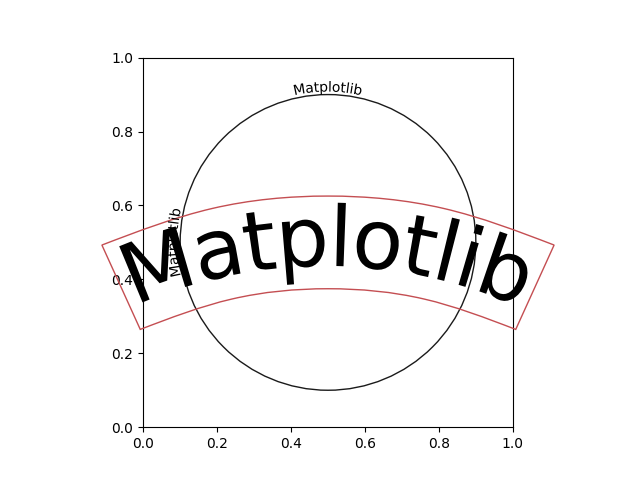
import matplotlib.pyplot as plt
from mpl_visual_context.patheffects import Recenter
from mpl_visual_context.patheffects_path import TextAlongArc

fig, ax = plt.subplots(num=1, clear=True)
ax.set_aspect(1)

t = ax.text(0.5, 0.5, "Matplotlib", size=60,
            va="center", ha="center", rotation=0,
            bbox=dict(ec="r", fc="none"))
t.set_path_effects([TextAlongArc(500, smooth_line=False)])
t.get_bbox_patch().set_path_effects([TextAlongArc(500, smooth_line=True,
                                                  n_split=4)])

from matplotlib.patches import Circle
cir = Circle((0.5, 0.5), 0.4, ec="k", fc="none")
ax.add_patch(cir)

t = ax.text(0.5, 0.9, "Matplotlib", size=10,
            va="bottom", ha="center", rotation=0)
recenter = Recenter(ax, 0.5, 0.5)
t.set_path_effects([recenter | TextAlongArc(None) | recenter.restore()])

t = ax.text(0.1, 0.5, "Matplotlib", size=10,
            va="bottom", ha="center", rotation=90, rotation_mode="anchor")
t.set_path_effects([recenter | TextAlongArc(None) | recenter.restore()])

# ax.set_aspect(1)
plt.show()
Total running time of the script: (0 minutes 0.052 seconds)